For homeschool families

Plan the whole school year in minutes.

Tell Lesson Garden how many lessons or pages are in each book. It works out the pace, spreads everything across your school year, and gives you a simple checklist for every child, every day.

For iPhone and iPad. From the makers of Transcript Maker.

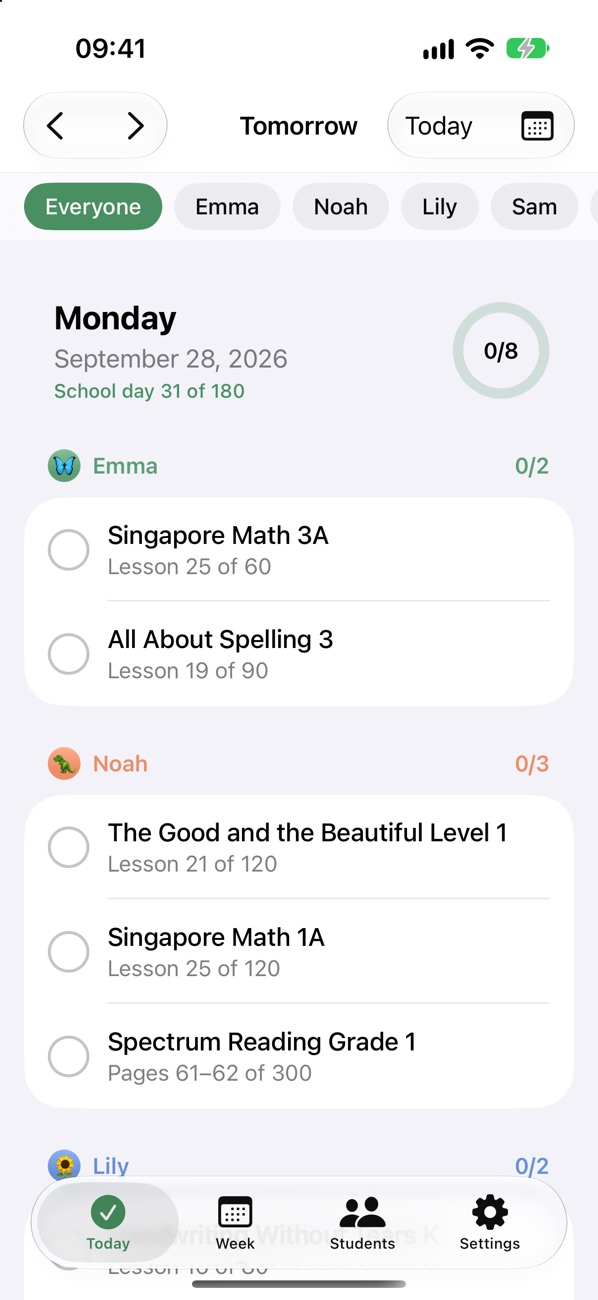
Lesson Garden's Today screen, listing each child's lessons for the day with checkboxes
✓ Singapore Math 3ALesson 25 · Emma
✓ Pages 61–62Spectrum Reading · Noah
120

lessons in this year's math book.

180

school days to get through it. So how many lessons a week?

Mon–Thu

Lesson Garden does the math and plans every lesson. Done by May, with Fridays free.
Features

Everything a busy homeschool mom needs. Nothing she doesn't.

No grade books or transcripts: just the plan, and a quick way to check it off.

Tell it the book. It plans the year.

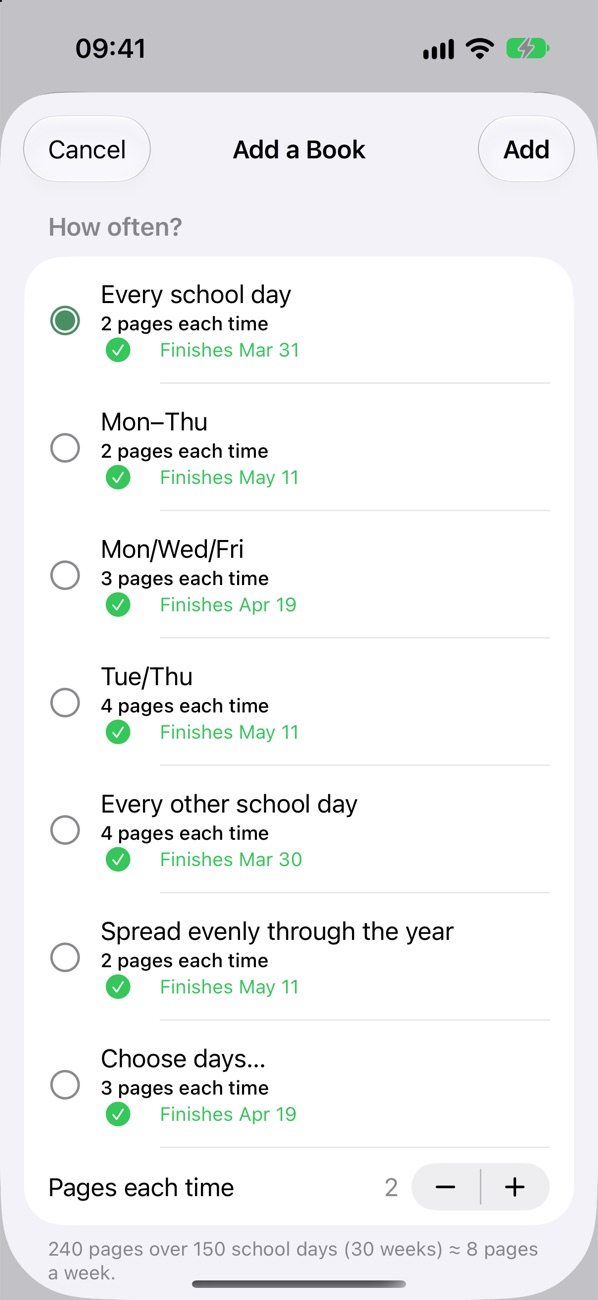
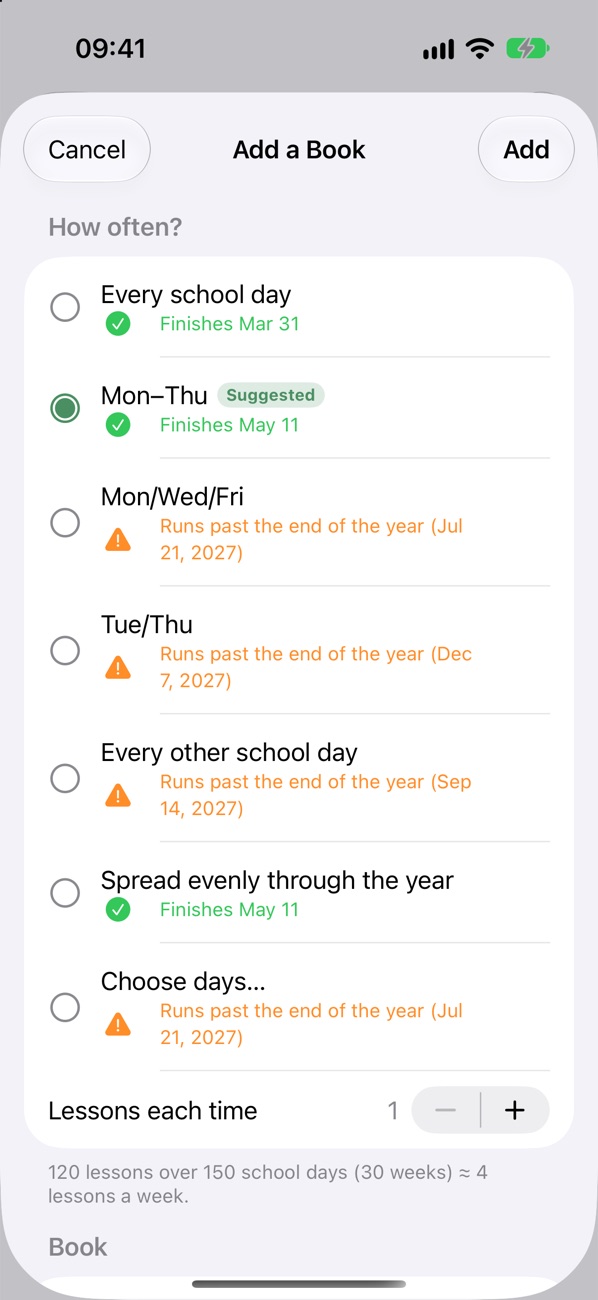
Enter how many lessons are in a book, and Lesson Garden compares every routine side by side, from every school day to Mon/Wed/Fri to spreading lessons evenly, with the date each one would finish.

  • Suggests the lightest routine that still finishes before the last day of school.
  • Warns you when a pace would run past the end of the year.
  • Your call: pick your own days, or double up lessons.
Choosing how often to do a 120-lesson book, with finish dates for each option and Mon–Thu suggested

Lessons or pages. One book or several.

Some books have numbered lessons. Some just have pages. Some curricula come in two or three books you work through in order. Lesson Garden handles all of them.

  • Page-based books: enter the page count and see how many pages to do each day.
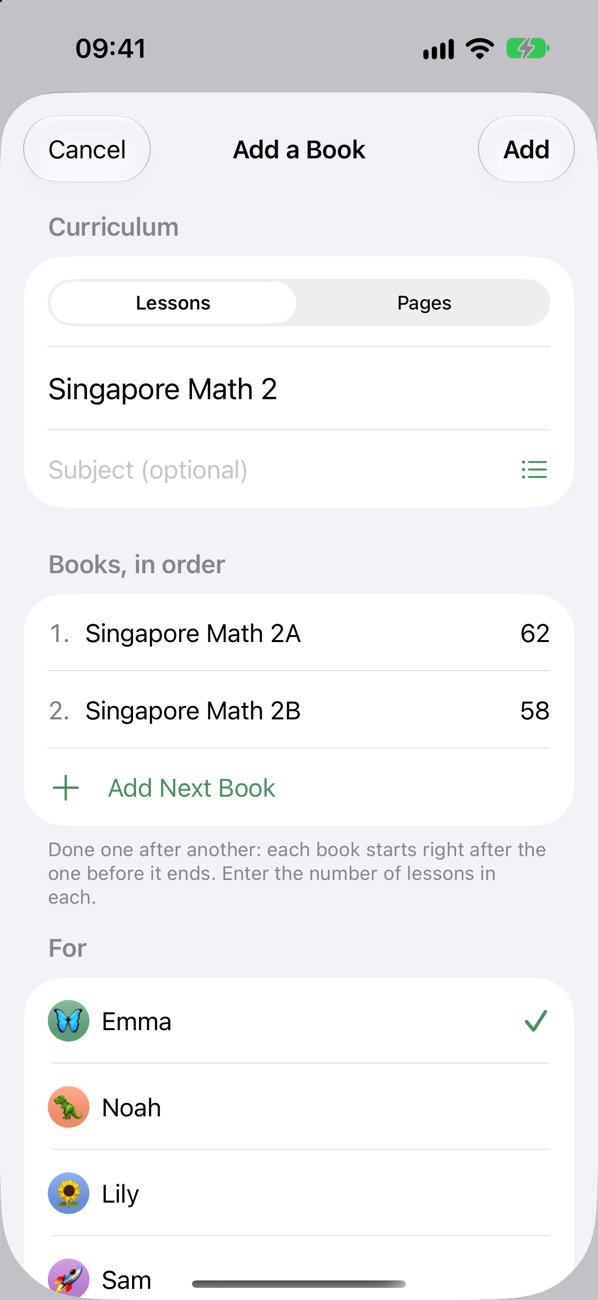
  • Multi-book curricula like Math 2A then 2B are planned as one continuous year.
  • Starting mid-book? Pick up from any lesson or page.
A 240-page book showing how many pages to do each time for each routine
A curriculum made of two books, Singapore Math 2A and 2B, done in order

A simple checklist for every day.

Open the app and today's lessons are waiting, grouped by child in their own color. Tap to check them off. That's it.

  • Filter by child or book when you're working one-on-one.
  • Mark lessons as you go, or all at once at the end of the day.
  • Breaks and holidays are skipped automatically.
Today's lessons grouped by child

A plan that keeps up with your kids.

Real school days don't go exactly as planned. Lesson Garden adjusts the schedule when your kids race ahead or fall behind, so you never have to redo it by hand.

  • Working ahead? Tap "Did the next lesson too," or tell it the page they read to, and the rest of the book moves up.
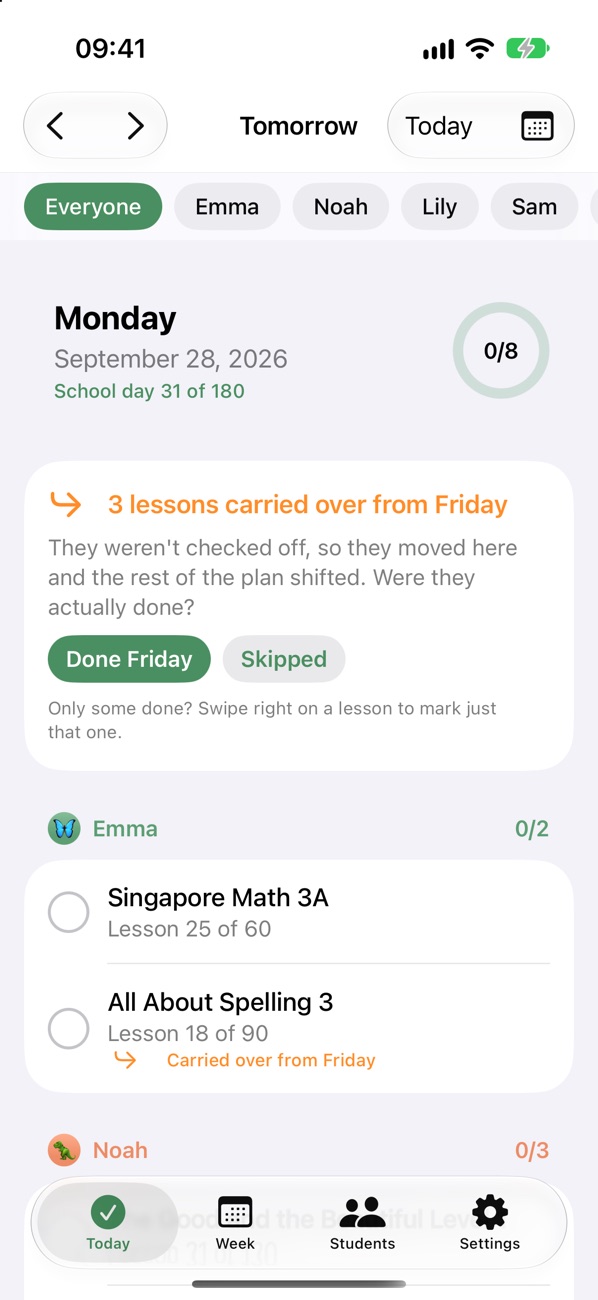
  • Missed a day? Unfinished lessons carry over to the next school day on their own, and the rest of the plan shifts.
  • Just forgot to check it off? One tap on "Done Friday" puts it back where it belongs.
Monday's lessons with a note that 3 lessons carried over from Friday, asking whether they were done or skipped

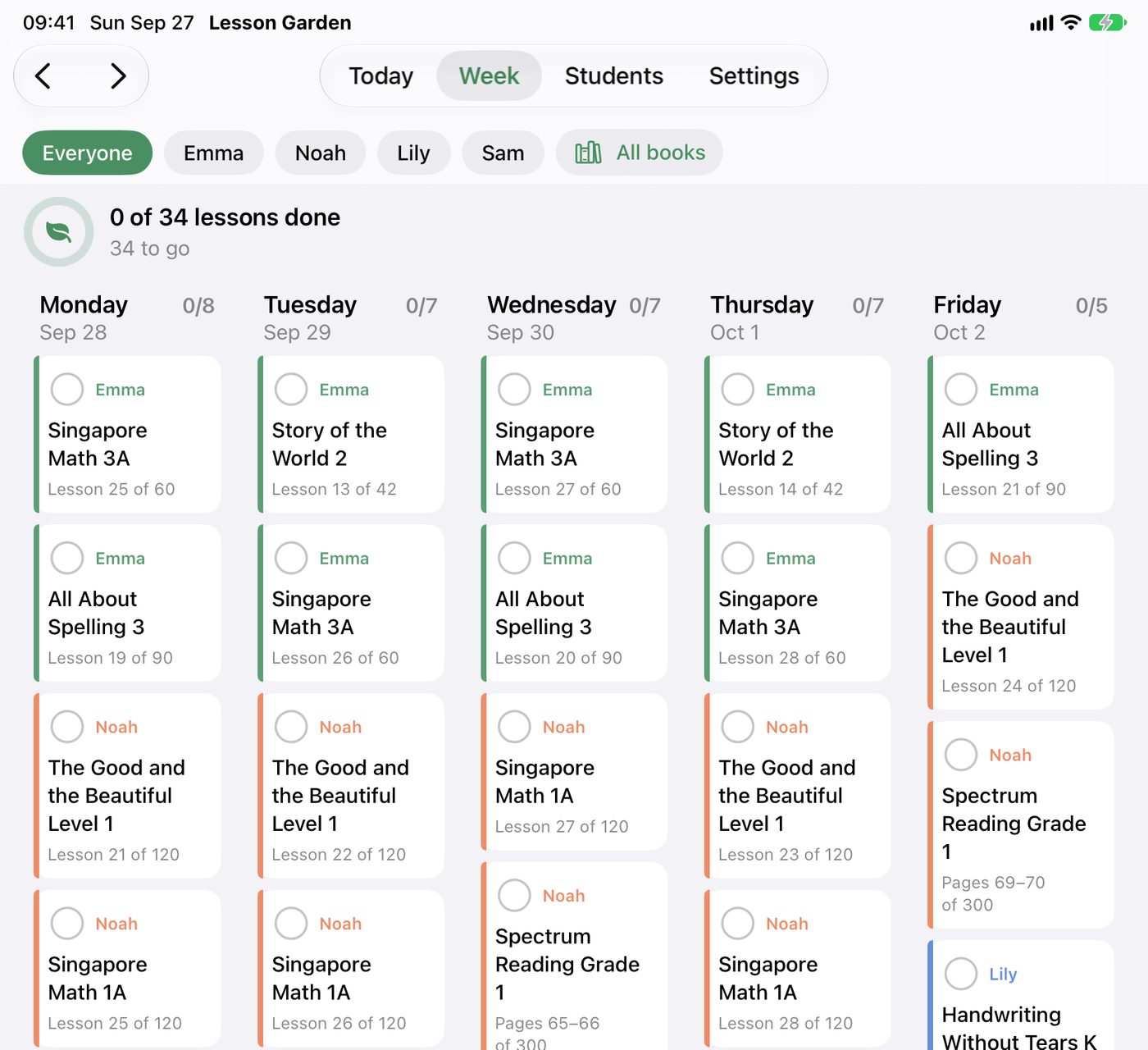
See the whole week at a glance.

On iPad, your week lays out like a paper planner, one column per day, so you can look ahead on Sunday night.

The week view on iPad with a column of lesson cards for each school day

Every child, their own color

Add all your kids, each with a color and a picture, so their lessons are easy to spot.

Share with your spouse

Both parents see the same plan. Check off a lesson on one phone and it shows up on the other.

Your school calendar

Set your first day, school days, and breaks. 180 days by default; change it to match your state.

Catch up without guilt

Sick day? Field trip? Unfinished lessons wait for the next school day, and the finish date adjusts.

Watch progress grow

See how far each child is through every book, and what's left before the end of the year.

Works offline

Everything lives on your device, so it works in the car, at the park, or at Grandma's.

How it works

Set up the year over one cup of coffee.

Add your kids

Give each child a name, a color, and a picture if they like.

Add their books

Enter the lessons or pages, pick a routine, and see when you'll finish.

Check it off

Each morning, today's lessons are ready. Tap as you go.

From the makers of Transcript Maker, helping homeschool families since 2006.

Thousands of homeschoolers have used Transcript Maker to put together their high school transcripts. Lesson Garden is for the years before that: a simple way to plan and check off the day-to-day lessons with your younger kids.

Questions

Good questions

Which devices does it work on?

iPhone and iPad. On iPad you also get the planner-style week view.

What if we're already partway through a book?

Tell Lesson Garden the lesson or page you're starting from, and it plans the rest from today.

What happens if we skip a day, or get ahead?

The plan adjusts itself. Missed lessons move to the next school day and the rest of the book shifts back; extra lessons done today pull the rest of the book forward. If lessons were done but just not checked off, tell Lesson Garden they were done and it puts everything back.

My state doesn't require 180 days. Can I change it?

Yes. Set the number of school days, which weekdays you do school, and any breaks or holidays.

Can my spouse use it too?

Yes. Invite them by email from Settings, and you'll both see the same plans and checkmarks on your own devices.

Is it for high school?

Lesson Garden is made for younger kids. It doesn't track grades, credit hours, or transcripts, and it keeps things simple on purpose.

What about Android or the web?

We're starting with iPhone and iPad. Android and a web version are on our list.

Coming soon to the App Store

We're putting the finishing touches on Lesson Garden. Leave your email and we'll let you know the day it's ready.